说明
近期在学习GO语言,想深入研读一下GO的源码,第一步就要是可以在本地正常的编译源代码,此文对MAC上go源的安装进行记录
下载go源码
git clone https://github.com/golang/go
选择go版本分支
本次使用go 1.8版本分支来进行编译,切换分支
git checkout release-branch.go1.8
本地编译
查看本地的go版本
go version
go version go1.20.5 darwin/amd64
设置编译源码的go版本
export GOROOT_BOOTSTRAP=$GOROOT
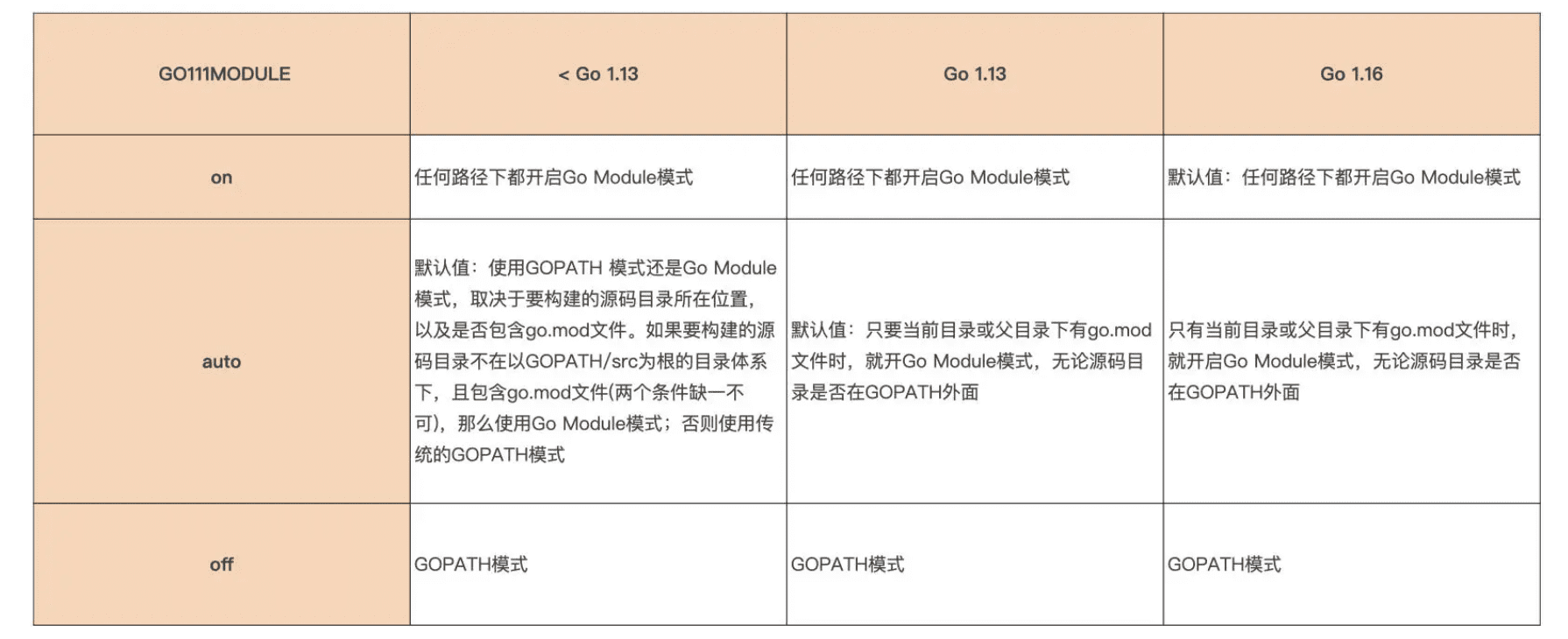
设置go mod模式为auto
因为在go1.16后,go默认在任何路径下都开启gomod模式,待编译的go源码不需要使用gomod模式,设置其它模式为自动
export GO111MODULE=auto
编译
cd go/src
./make.bash
输出结果如下
Installed Go for darwin/amd64 in /Users/tomyli/github/go Installed commands in /Users/tomyli/github/go/bin
测试验证
修改go1.8的fmt包,增加一行打印内容,打印出来 tomyli
/Users/tomyli/github/go/src/fmt/print.go
func Println(a ...interface{}) (n int, err error) {
    println("tomyli")
    return Fprintln(os.Stdout, a...)
}
重新编译
cd go/src
./make.bash
验证脚本
创建一个新编译的go的GOPATH
mkdir /Users/tomyli/github/go/localhost
测试脚本保存到localhost文件夹
main.go内容如下
package main

import "fmt"

func main() {
    fmt.Println("Hello world!")
}
配置新编译的GO的GOROOT与GOPATH变量
此步骤必须,否则执行时会从boot版本的go查找

export GOROOT=/Users/tomyli/github/go
export GOPATH=/Users/tomyli/github/go/localhost
执行
~/github/go/bin run ~/github/go/localhost/main.go
输出结果
tomyli Hello world!
总结
以为源码编译会很轻松,真正实践时还是遇到了几个问题,源码编译需要有一个安装好的go,对于gomod的使用环境和GOROOT,GOPATH的变量含义更深刻了一些
REF
error while installing go from source - Stack Overflow
Captured On: [2023-09-20 Wed 11:38]
go: cannot find main module, but found .git_jenkins pipeline 时go: cannot find main module, but_shankusu2017的博客-CSDN博客
Captured On: [2023-09-20 Wed 11:38]
MAC 修改golang源码并编译_mac下重新编译go_xiaopengyaonixi的博客-CSDN博客
Captured On: [2023-09-20 Wed 14:56]